
Most common issues with playing multiplayer on "FOUNDRY"
Most common issues with playing multiplayer on "FOUNDRY"
Here you can find some solutions for the most common issues with FOUNDRY multiplayer. It's separated into two sections, for the "Steam" or "itch.io" version as their multiplayer mode works differently.
In case this page does not help, please visit our Discord for additional help.
Steam multiplayer works through the regular Steam multiplayer service where you only need to invite or join friends from your Steam friendlist.
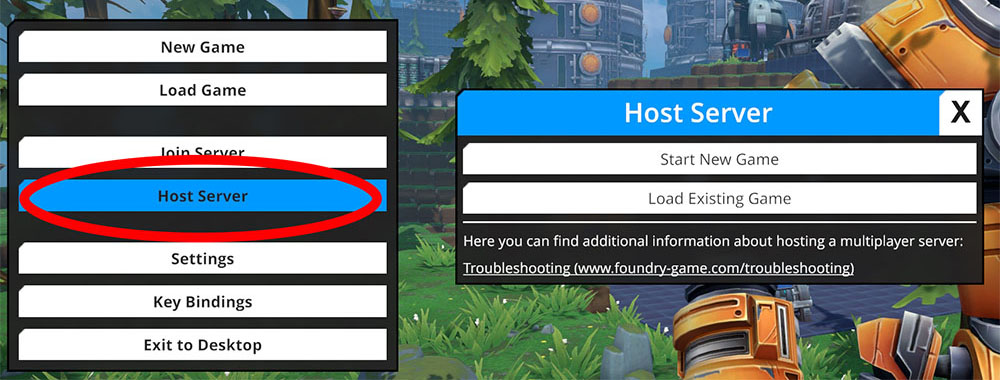
When starting a new game (or loading an existing one) you can do it in single player mode (regular new/load game buttons in main menu) or in multiplayer mode (host server button in main menu). Make sure the game is started in host mode, or others won't be able to join!
Steam has several privacy settings and one of them (Steam Profile > Edit > Privacy Settings > My Profile / Game Details) sets if someone else is able to join your game. If those settings are set to private your friends are only able to join your game after you invited them.

If you get an invite without the game running, the game will start and you should join automatically. But sometimes joining without the game already running does not work properly. Try again once you're already in the game's main menu.
Most of the time this caused by very restrictive internet settings, firewalls (soft- and hardware), anti-virus other similar applications.
itch.io multiplayer works through regular p2p connections, the joining player needs to connect by enterting IP and port of the host.
If you are hosting you need to make sure that clients can connect to your PC.This is by default blocked by your router (if you have one) and maybe your software firewall (if you have one). Additionally other people need your public IP address which can be found out by using a service like www.whatsmyip.org. The following process will be streamlined and obsolete when FOUNDRY comes to Steam. Meanwhile here is a quick guide on how to host a multiplayer server.
The process is called "port-forwarding", every router has this option but sometimes it's called differently (use online search about your router name/model to find detailed information). You need create a new entry/rule for the port you have selected in the settings of FOUNDRY (default is 3724), set TCP mode and forward it to the local IP of your PC. The local IP can be found by running the command line command "ipconfig /all" and look for "IPv4 Address". On most systems the local IP of your PC will start with 192.168.xxx.xxx.
Software firewalls (including Windows Firewall) will need an exception for incoming traffic on the same port for TCP.